Structured Output from LLMs: The Complete Guide to Getting JSON You Can Trust
You call the API. The model returns a beautifully written paragraph. But you needed JSON. So you wrap it in JSON.parse(), cross your fingers, and watch it crash in production because the model decided to add a friendly "Here's the data you requested:" before the actual JSON.
Sound familiar? Every developer who's built an AI-powered feature has hit this wall. The model is brilliant at generating text, but getting it to return reliable, parseable, typed data is a different game entirely.
This guide covers three approaches to structured output - from the quick-and-dirty to the production-grade - with real code examples you can use today. And there's an interactive playground below where you can see all three approaches side by side for different use cases.
Why Structured Output Matters
AI-generated text is great for chatbots. But most real-world applications need data, not prose:
- Extract contact info from an email and save it to your CRM
- Parse product listings into your database schema
- Classify support tickets with category, priority, and suggested response
- Analyze sentiment with confidence scores and topic tags
- Generate calendar events from natural language descriptions
In all these cases, you need the model to return a specific shape of data - not a polite paragraph about the data. You need structured output.
The Three Approaches
There are three main ways to get structured output from an LLM, listed from simplest to most robust:
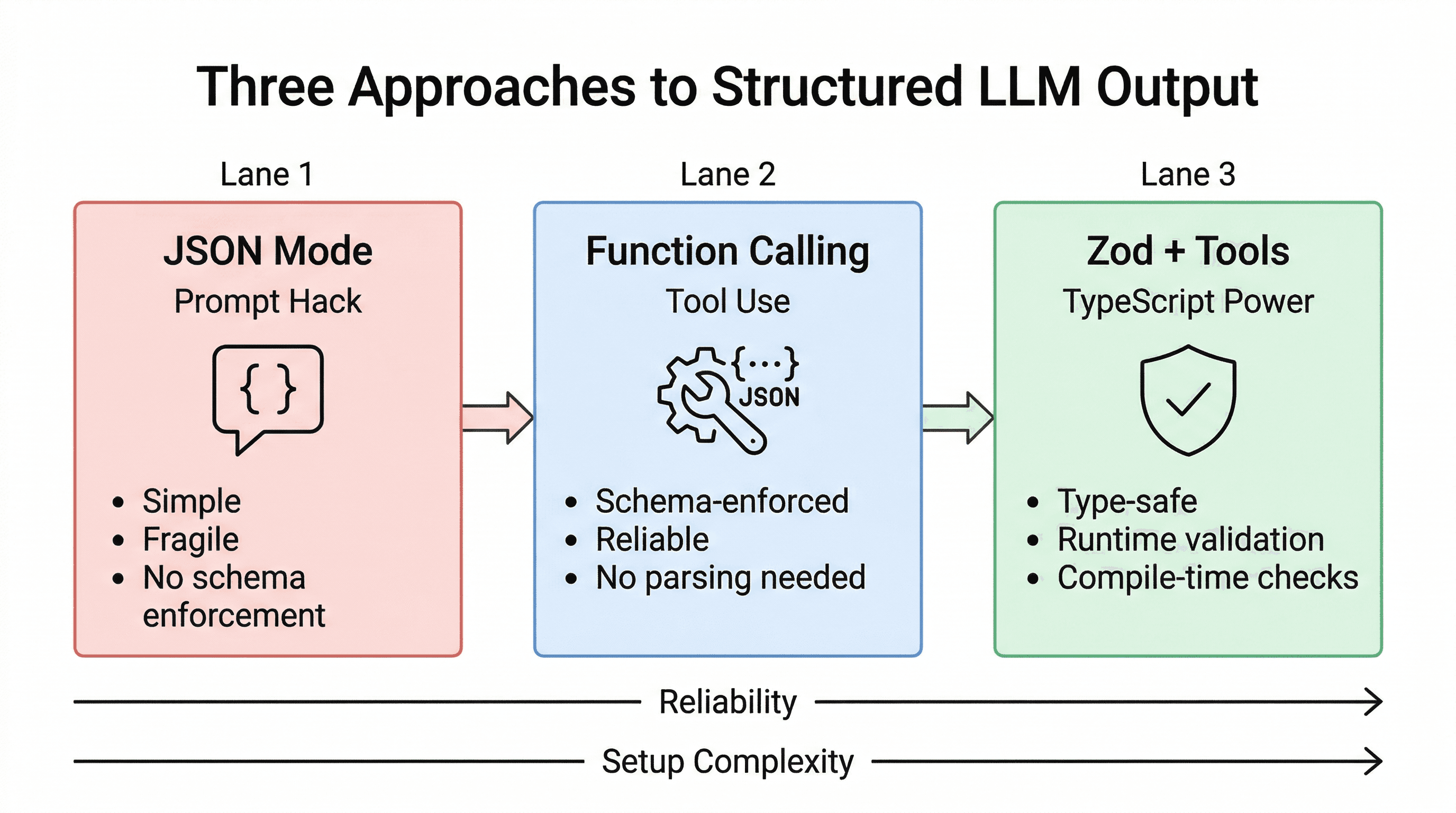
1. JSON Mode (The Prompt Hack)
The simplest approach: tell the model to return JSON in your prompt, then parse the response.
const response = await anthropic.messages.create({
  model: "claude-sonnet-4-20250514",
  max_tokens: 1024,
  messages: [{
    role: "user",
    content: `Extract the name and email from this text.
Return ONLY valid JSON: { "name": string, "email": string }

Text: Hi, I'm Sarah at sarah@acme.io`
  }]
});

const data = JSON.parse(response.content[0].text);
Pros: Dead simple. Works with any model. No extra API features needed.
Cons: Fragile. The model might add commentary before/after the JSON. It might use slightly different field names. It might return invalid JSON. There's no schema enforcement - you're relying entirely on the prompt to constrain the output.
When to use it: Quick prototypes, simple extractions, or when you want to test an idea before committing to a more robust approach. Not recommended for production unless you add validation on top.
2. Function Calling / Tool Use (The Right Way)
This is the production-grade approach. Instead of asking the model to output JSON, you define a tool (function) with a JSON Schema, and the model returns data that conforms to that schema.
const response = await anthropic.messages.create({
  model: "claude-sonnet-4-20250514",
  max_tokens: 1024,
  tools: [{
    name: "extract_contact",
    description: "Extract contact information from text",
    input_schema: {
      type: "object",
      properties: {
        name: { type: "string", description: "Full name" },
        email: { type: "string", description: "Email address" }
      },
      required: ["name", "email"]
    }
  }],
  tool_choice: { type: "tool", name: "extract_contact" },
  messages: [{
    role: "user",
    content: "Hi, I'm Sarah at sarah@acme.io"
  }]
});

// Already structured - no JSON.parse needed!
const data = response.content[0].input;
// { name: "Sarah", email: "sarah@acme.io" }
The key insight: tool_choice: { type: "tool", name: "..." } forces the model to call that specific tool. The response is already parsed - no JSON.parse, no regex, no hoping the model follows instructions. The schema is enforced at the API level.
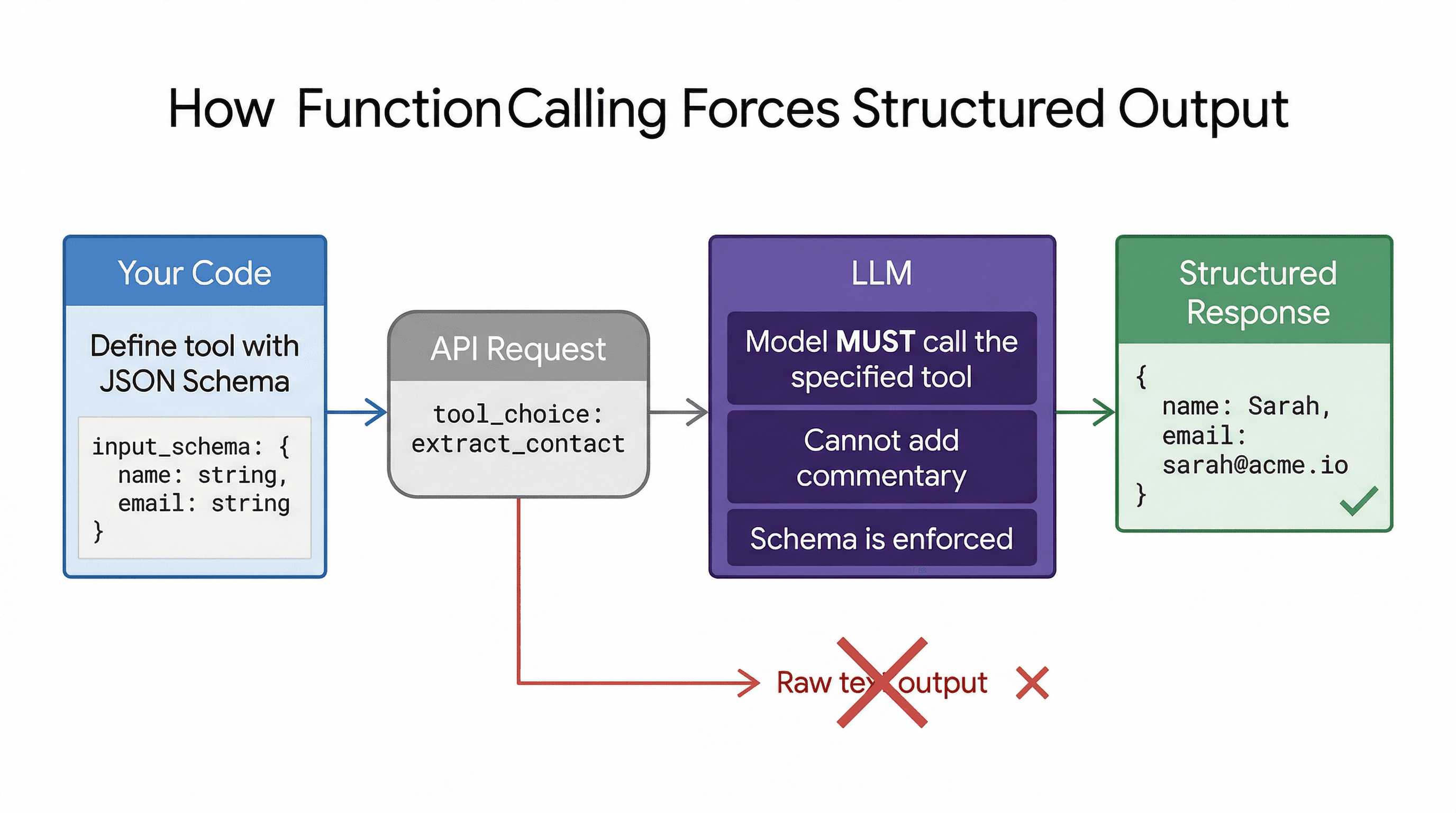
Pros: Reliable. Schema-enforced. No parsing needed. Works consistently in production.
Cons: Slightly more setup. You need to write JSON Schema (verbose). Provider-specific API shape.
When to use it: Any production application that needs structured output. This should be your default approach.
3. Zod + Tool Use (The TypeScript Power Move)
If you're using TypeScript, you can combine function calling with Zod to get end-to-end type safety: define your schema once, use it for the API call, validate the response, and get full TypeScript inference.
import { z } from "zod";

const ContactSchema = z.object({
  name: z.string(),
  email: z.string().email(),
  phone: z.string().optional(),
});

// Convert Zod schema to JSON Schema for the API
const response = await anthropic.messages.create({
  model: "claude-sonnet-4-20250514",
  max_tokens: 1024,
  tools: [{
    name: "extract_contact",
    description: "Extract contact info",
    input_schema: zodToJsonSchema(ContactSchema)
  }],
  tool_choice: { type: "tool", name: "extract_contact" },
  messages: [{ role: "user", content: inputText }]
});

// Validate + get full TypeScript types
const data = ContactSchema.parse(response.content[0].input);
// data.name - string ✓
// data.email - string ✓
// data.phone - string | undefined ✓
This pattern gives you the trifecta: the model is constrained by JSON Schema at the API level, the response is validated by Zod at runtime, and TypeScript gives you compile-time type safety. If the model returns something unexpected, Zod throws immediately instead of letting bad data propagate through your app.
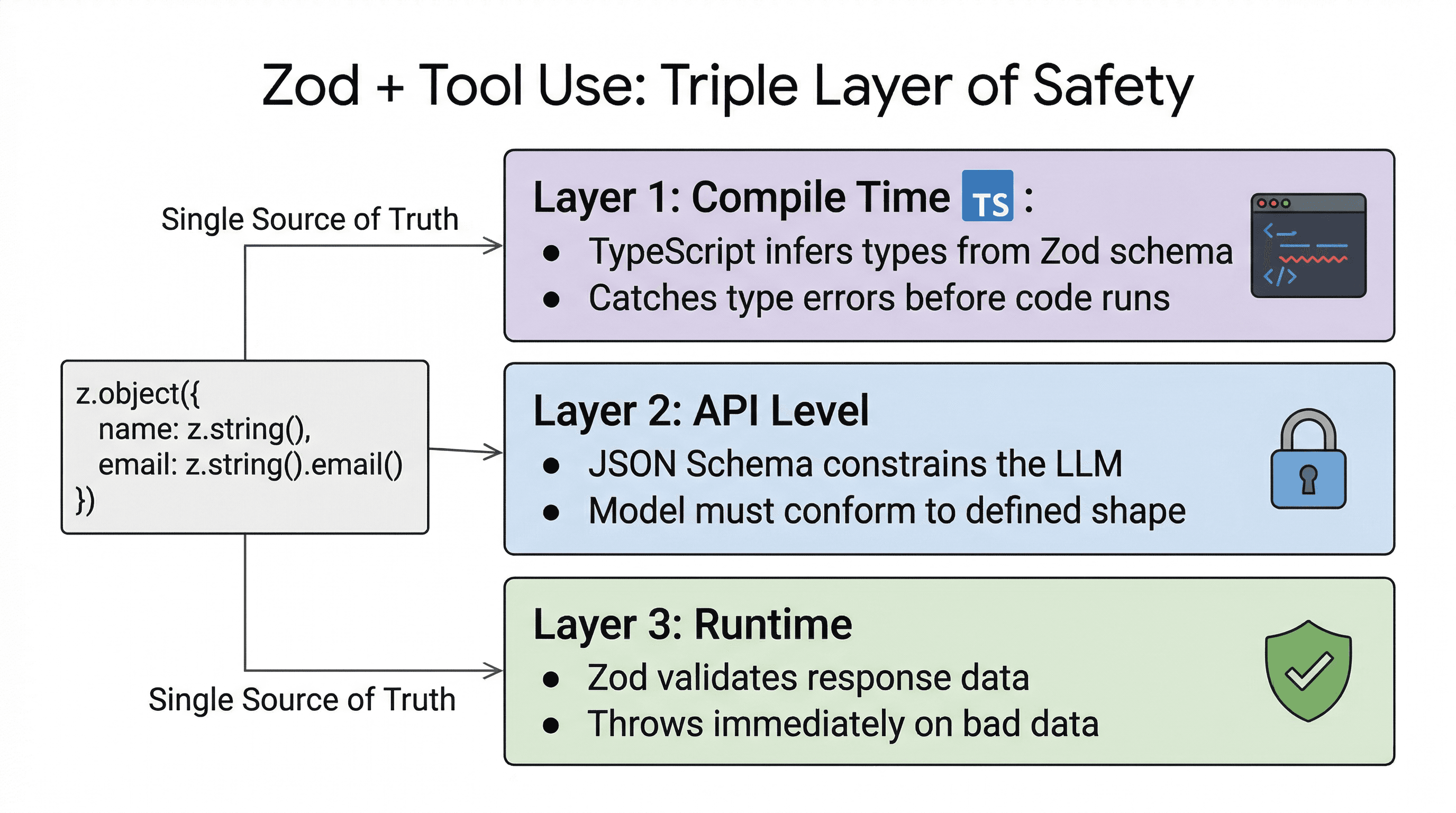
Pros: Type-safe end to end. Validation at every layer. One source of truth for your data shape.
Cons: Requires Zod and a zod-to-json-schema library. More setup. Overkill for a quick script.
When to use it: TypeScript production apps where data integrity matters. This is what I use in my own projects.
Try It: Interactive Playground
Pick a use case, switch between approaches, and see the generated code + expected output. Copy the code directly into your project.
Common Pitfalls (and How to Avoid Them)
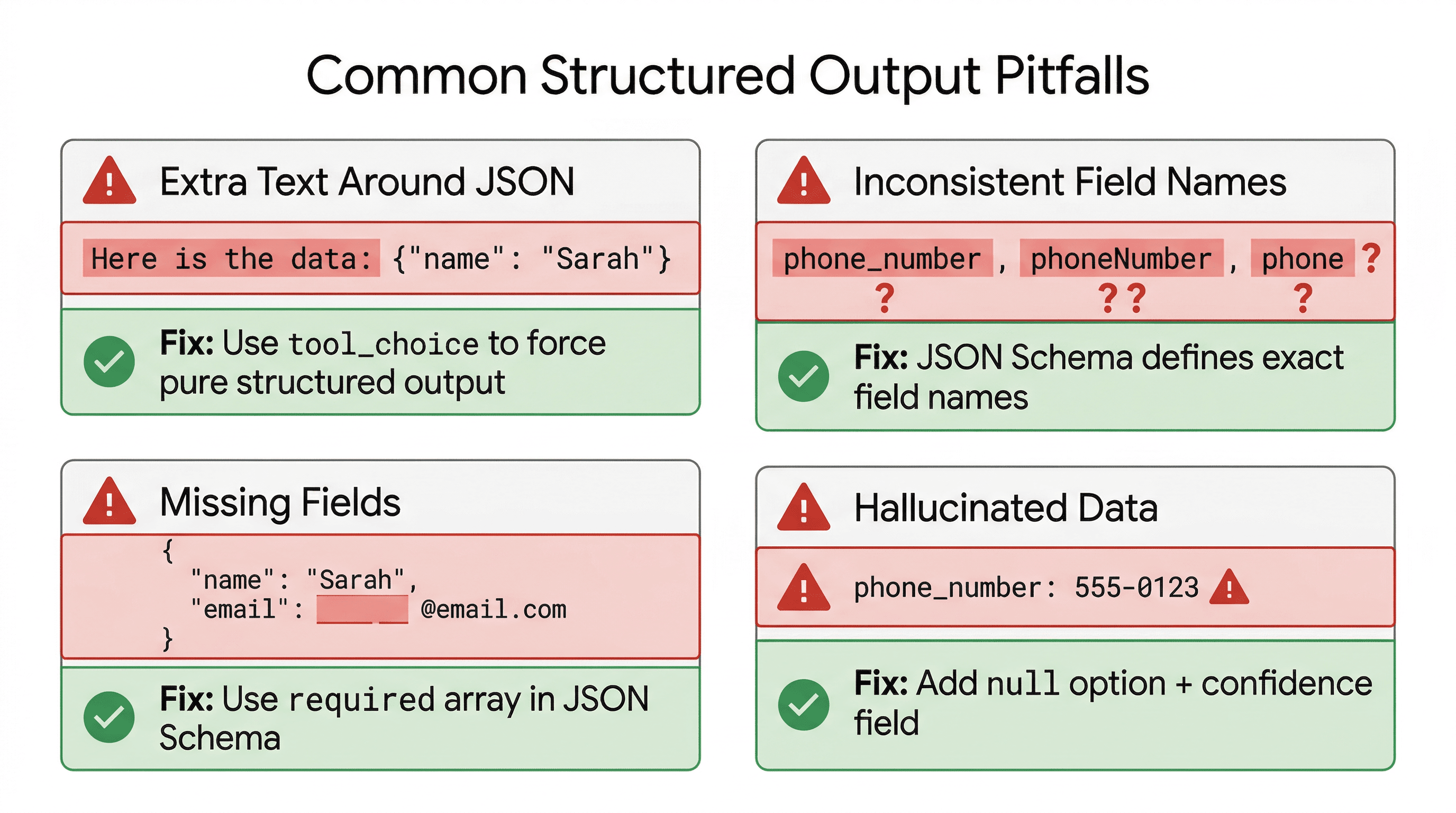
1. The model adds extra text around your JSON
Problem: "Here's the JSON: {"name": "Sarah"}"
Fix: Use function calling. With tool_choice set to a specific tool, the model can't add commentary - the response is pure structured data.
2. Inconsistent field names
Problem: Sometimes the model returns phone_number, sometimes phoneNumber, sometimes phone.
Fix: JSON Schema in function calling defines exact field names. The model must use them. For extra safety, validate with Zod.
3. Missing or null fields
Problem: The model omits fields when the input doesn't contain that information.
Fix: Use required in your JSON Schema to list mandatory fields. For optional fields, define them explicitly and handle null in your code. With Zod, use .optional() or .nullable().
4. Hallucinated data
Problem: The input says "Call me at the office" and the model invents a phone number.
Fix: Add "If a field is not present in the input, return null" to your tool description. You can also add a confidence field so the model can signal uncertainty. But remember: structured output solves the format problem, not the accuracy problem. Validate critical data against external sources.
5. Nested or complex schemas fail
Problem: Deeply nested schemas with arrays of objects cause the model to make mistakes.
Fix: Keep schemas as flat as possible. If you need nested data, break it into multiple tool calls or use a two-step extraction (extract top-level first, then details). Simpler schemas = more reliable output.
Which Approach Should You Use?
| Scenario | Approach | Why |
|---|---|---|
| Quick prototype | JSON Mode | Fast to set up, good enough to test your idea |
| Production API | Function Calling | Schema-enforced, reliable, no parsing surprises |
| TypeScript app | Zod + Tools | End-to-end type safety, runtime validation |
| Multi-provider | Zod + Tools | Zod schema is provider-agnostic, convert to any format |
| Simple extraction | Function Calling | Minimal setup, maximum reliability |
The Bottom Line
Structured output isn't a nice-to-have - it's table stakes for any AI feature that does more than chat. The models are smart enough to return whatever shape you need; the question is whether you're constraining them properly or hoping they follow your prompt.
Start with function calling (approach #2) for every new feature. It's the right tradeoff between simplicity and reliability for most use cases. Graduate to Zod + tools when you need type safety or when your schemas get complex.
And stop wrapping JSON.parse() in a try-catch and calling it a day. Your users deserve better.
Related Reading
- How LLMs Actually Work - Understanding why models struggle with structured output (and why tool use fixes it)
- Which LLM Should You Choose in 2026? - Picking the right model for your structured output needs
- The Stack I'd Use to Build Any AI App in 2026 - The full tech stack where these patterns fit
- Inside Every AI Agent - How agents use tool calls (the same mechanism behind structured output)
