n8n vs Zapier vs Make: Why Developers Are Switching to n8n in 2026
The Automation Problem for Developers
You built your SaaS with Cursor or Claude Code. It works. Users are signing up. Now you need automations: send a welcome email when someone registers, sync new customers to your CRM, post to Slack when a payment fails, generate an invoice after checkout.
The classic answer is Zapier. It's the tool everyone knows. But if you're a developer - even a solo builder - Zapier will frustrate you within a week. The pricing scales badly, the debugging is painful, and you can't write code when the visual builder falls short.
Make (formerly Integromat) is better for complex flows, but it still locks you into their cloud, and pricing gets steep fast.
Then there's n8n - the open-source automation platform that's been quietly winning over developer teams. Here's why.
What Is n8n?
n8n (pronounced "nodemation") is a workflow automation tool with a visual editor, like Zapier and Make. But it's built for developers. The key differences:
- Self-hostable - run it on your own server, VPS, or Docker container. Your data never leaves your infrastructure.
- Code nodes - drop into JavaScript or Python whenever the visual builder isn't enough. Write custom logic, transform data, call APIs directly.
- Fair-code license - the source code is on GitHub. You can inspect it, extend it, and self-host it for free.
- 400+ integrations - Slack, Stripe, Google Sheets, OpenAI, Supabase, PostgreSQL, HTTP requests, and more.
The Comparison: n8n vs Zapier vs Make
Pricing
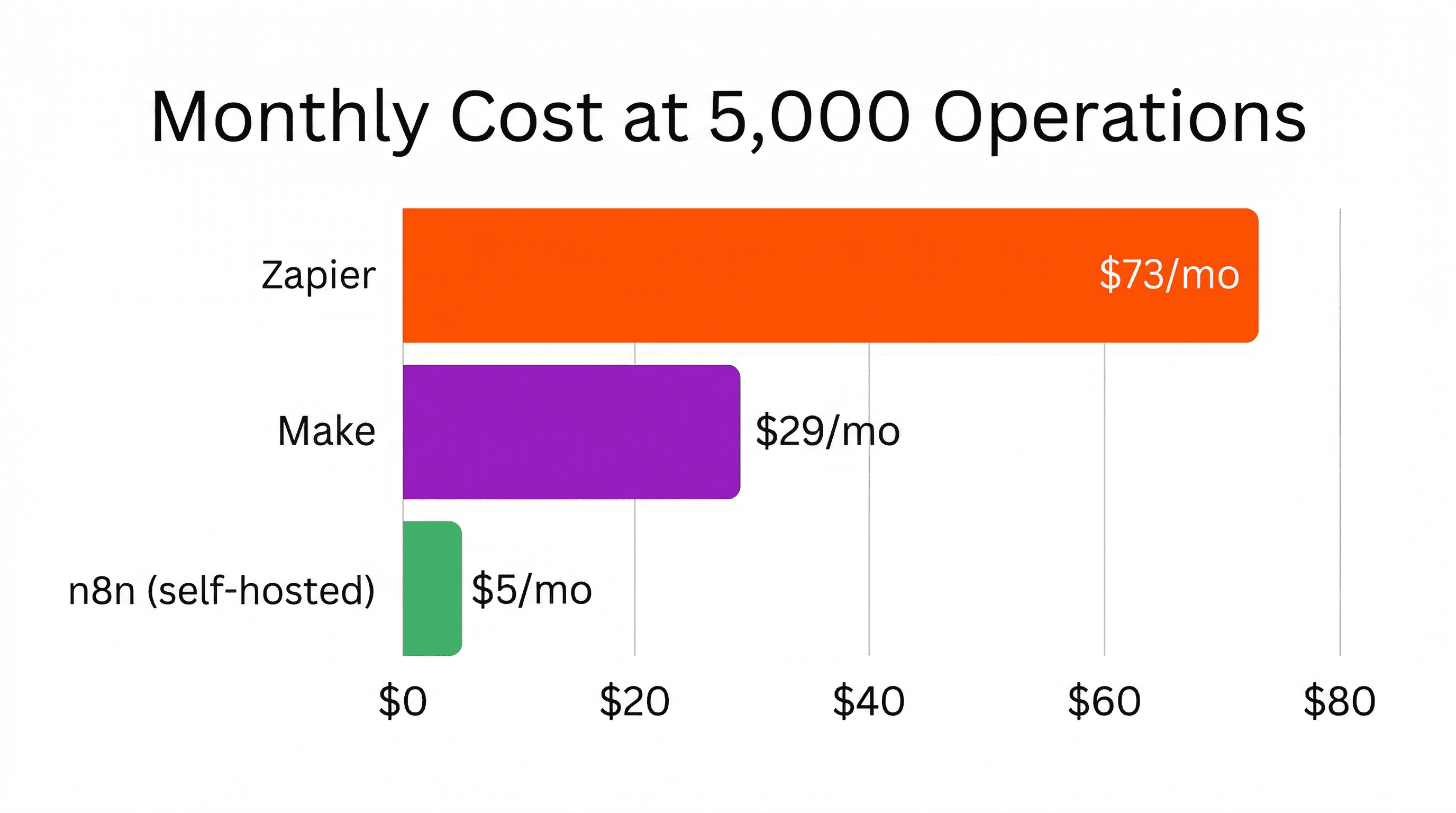
This is where n8n pulls ahead immediately. Zapier charges per task (each step in a workflow counts). A simple 5-step workflow that runs 1,000 times/month burns through 5,000 tasks. At Zapier's pricing, that gets expensive fast.
Make charges per operation, which is similar but slightly cheaper. Still, as your workflows grow, costs scale linearly with usage.
n8n self-hosted is free. Unlimited workflows, unlimited executions. You only pay for the server (a $5/month VPS handles most use cases). n8n Cloud starts at $24/month with generous limits - still far cheaper than Zapier or Make at scale.
Developer Experience
Zapier is designed for non-technical users. That's great for marketing teams, but it means the tool actively gets in your way when you need to do anything custom. It has basic code steps, but limited data transformation and shallow debugging compared to n8n.
Make is better - it has a more powerful visual builder with routers, iterators, and error handlers. But debugging is still a black box, and when you need custom logic, you're stuck with their limited expression language.
n8n gives you the best of both worlds. The visual editor is intuitive enough for simple flows, but when you need to write code, you drop in a Code node and write JavaScript:
// n8n Code Node example
// Transform incoming webhook data
const items = $input.all();

return items.map(item => {
  const data = item.json;
  return {
    json: {
      fullName: `${data.firstName} ${data.lastName}`,
      email: data.email.toLowerCase().trim(),
      signupDate: new Date().toISOString(),
      plan: data.plan || 'free',
      source: 'website',
    }
  };
});
Self-Hosting and Data Privacy
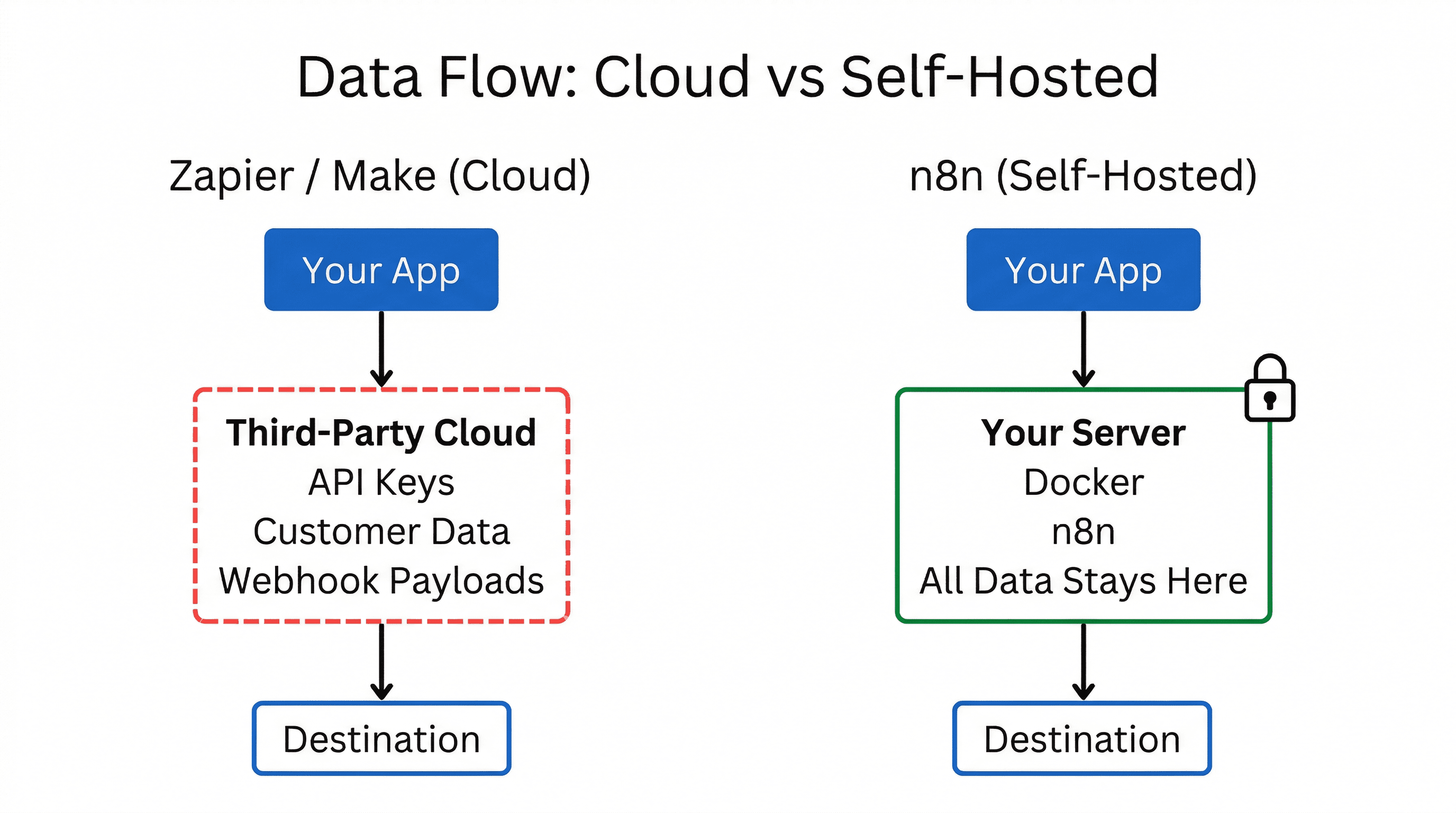
With Zapier and Make, your data flows through their servers. Every API key, every customer email, every webhook payload passes through a third party. For some industries (healthcare, fintech, anything touching EU user data under GDPR), that's a non-starter.
n8n can run entirely on your infrastructure. Spin it up with Docker in 60 seconds:
docker run -it --rm \
  --name n8n \
  -p 5678:5678 \
  -v n8n_data:/home/node/.n8n \
  n8nio/n8n
Your credentials stay on your server. Your workflow data stays on your server. Your customer data never touches a third party.
Error Handling and Debugging
Zapier's error handling is essentially "retry or stop." When something breaks, you get a vague error message and limited ability to inspect what went wrong.
n8n gives you proper error workflows. You can catch errors, route them to Slack, log them to a database, retry with different parameters, or trigger a fallback workflow. Each execution shows the exact input and output of every node, so debugging is actually possible.
AI Integration
All three platforms now support AI integrations, but n8n's approach is the most developer-friendly. It has native nodes for OpenAI, Anthropic (Claude), Google Gemini, and local models via Ollama. You can build AI agents directly in n8n with the AI Agent node - complete with memory, tools, and chain-of-thought reasoning.
Need to build a support bot that reads your docs, checks your database, and responds to customers? n8n can do that in a single workflow, without writing a line of backend code.
When to Use Each Tool
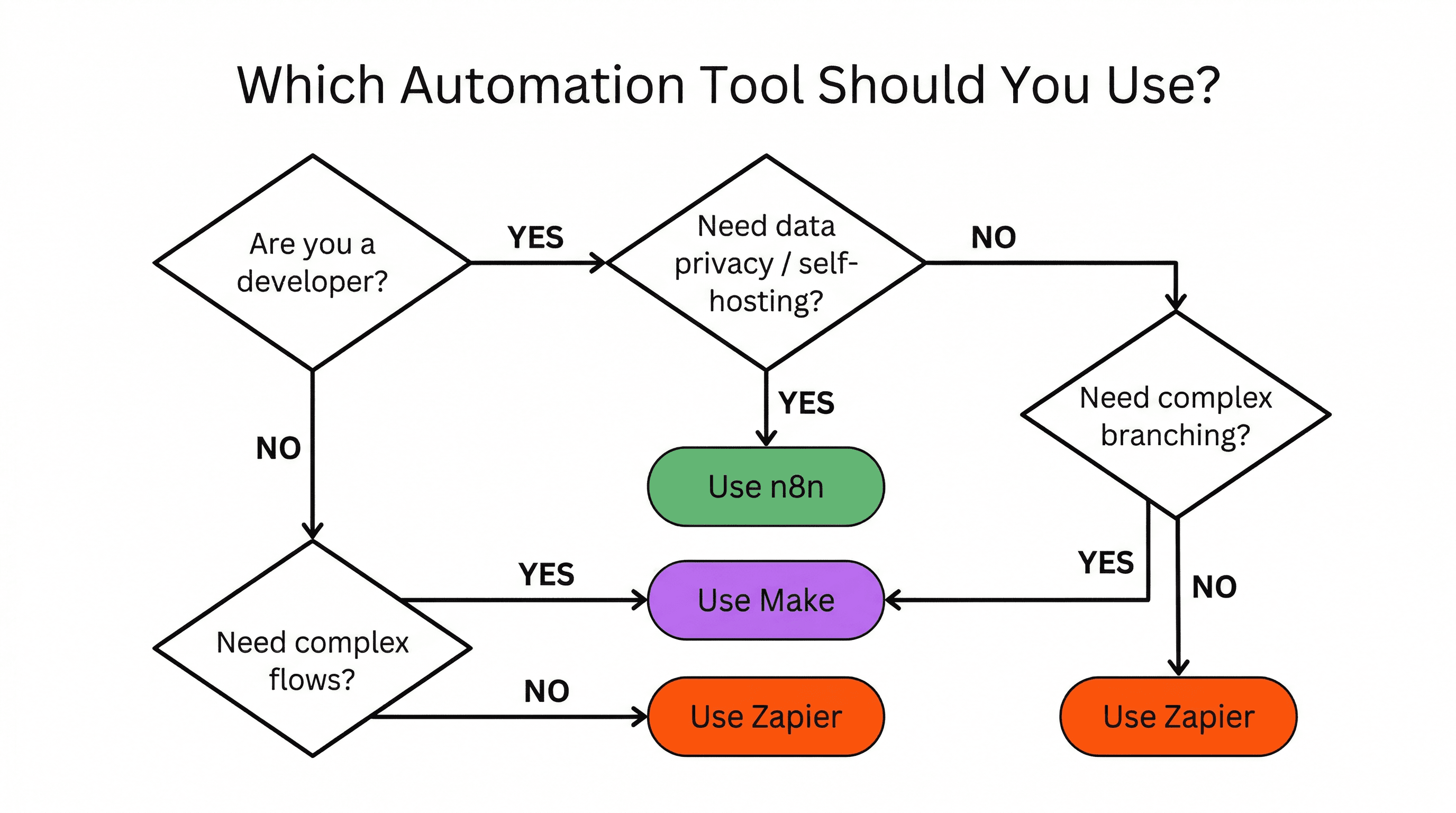
- Zapier - you're non-technical, need simple A-to-B automations (new form submission → add to Google Sheet), and don't mind paying per task.
- Make - you need more complex visual flows with branching and iteration, but don't want to self-host anything.
- n8n - you're a developer (or a team with developers), you want control over your data, you need code nodes for custom logic, and you don't want to pay $50+/month for automations that a $5 VPS can handle.
For Solo Builders
If you built your app with Cursor, Bolt, or Lovable, you probably haven't thought about automation yet. But the moment you have real users, you'll need it. Welcome emails, payment webhooks, CRM syncing, admin notifications - this stuff adds up fast.
The temptation is to hardcode these automations into your app. Don't. That creates a maintenance nightmare and tightly couples your business logic to your codebase.
n8n lets you build these automations visually, with the escape hatch of code when you need it. It's the automation layer your app is probably missing - and at $0/month self-hosted, there's no reason not to set it up.
In my next post, I'll walk you through the exact n8n workflows every SaaS needs - from user onboarding to payment failure recovery.
More blog posts
